The days of manually clicking through cloud consoles to provision servers, configure firewalls, and set up virtual networks are long gone. For modern enterprises in the USA, speed, scalability, and security are non-negotiable. That is where Infrastructure as Code (IaC) steps in, and HashiCorp Terraform is the reigning champion of this domain.
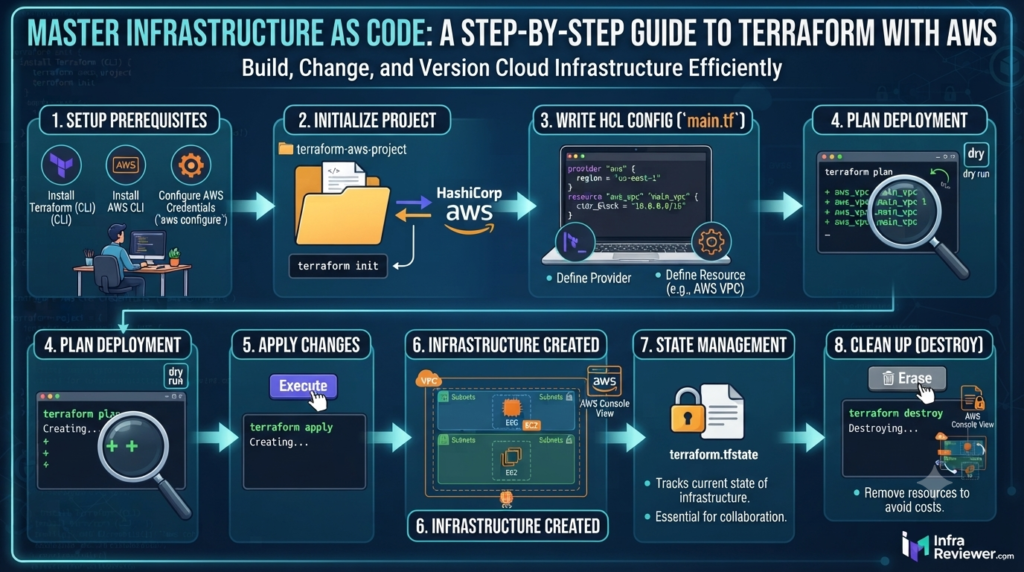
In this comprehensive guide, we will break down exactly how Terraform works, walk through a step-by-step live deployment on AWS using real visual snippets, and show you how to automate your cloud infrastructure in seconds.
1.Defining the Tool
Understanding Terraform as an open-source Infrastructure as Code (IaC) framework.
Before diving into the code, it is essential to understand what Terraform actually does at its core.
Technical Definition: Terraform is an industry-standard, open-source Infrastructure as Code (IaC) tool created by HashiCorp. It allows software and network engineers to define, provision, and configure cloud infrastructure using a high-level configuration language safely and predictably.
2.The Multi-Cloud Advantage
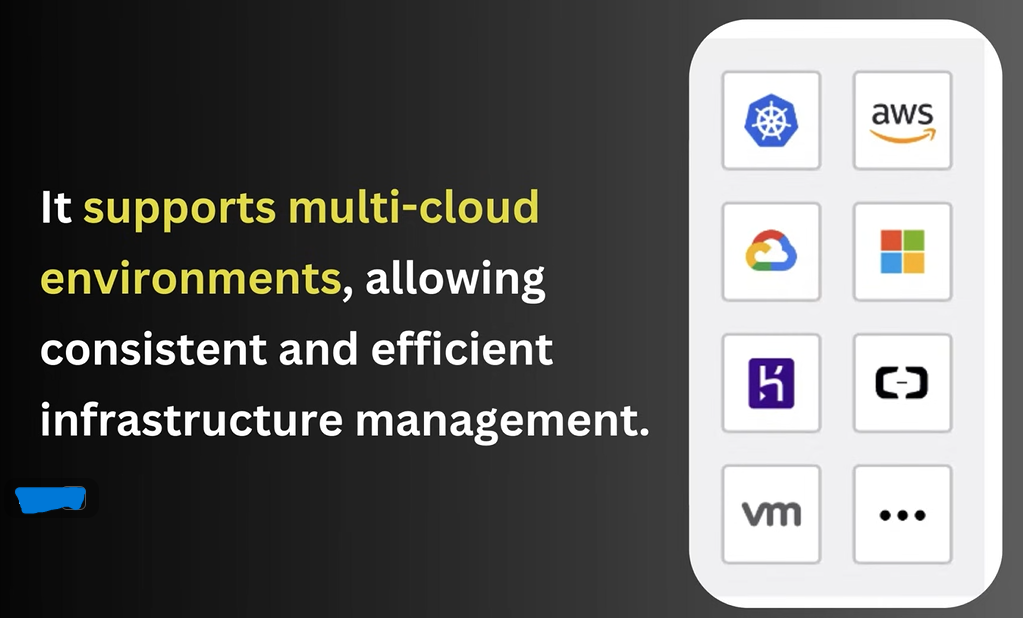
Terraform’s native compatibility with major multi-cloud and containerized environments.
One of the primary reasons enterprises favor Terraform over cloud-native tools (like AWS CloudFormation) is its incredible flexibility across diverse environments.
Technical Definition: Unlike cloud-specific tools, Terraform features agnostic multi-cloud support. It seamlessly integrates with top-tier providers like AWS, Microsoft Azure, Google Cloud Platform, and Kubernetes, offering IT organizations a single, unified workflow to manage hybrid environments smoothly
3.Deconstructing the Code Structure
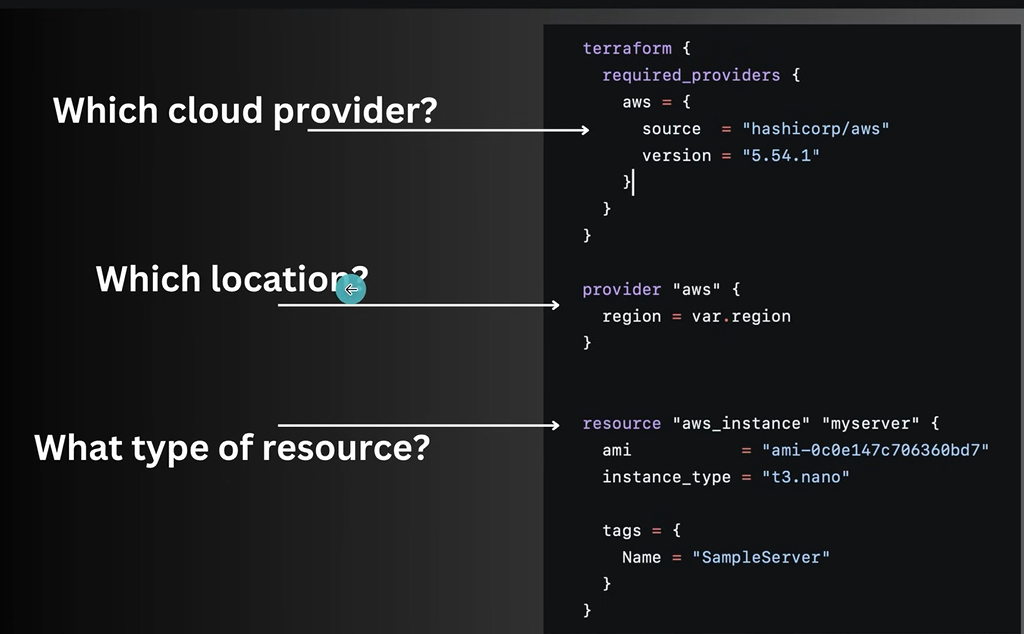
Breaking down the essential blocks of a configuration script: Provider, Location, and Resource.
Writing a Terraform file requires a basic understanding of its declarative syntax. The block blueprint is divided into distinct, logical components.
Technical Definition: To deploy assets efficiently, a standard Terraform script isolates key infrastructural parameters. It explicitly specifies the target cloud provider, declares the geographic deployment location or availability zone, and maps out the exact hardware resource types to be provisioned.
4.Syntax Flexibility (HCL vs JSON)
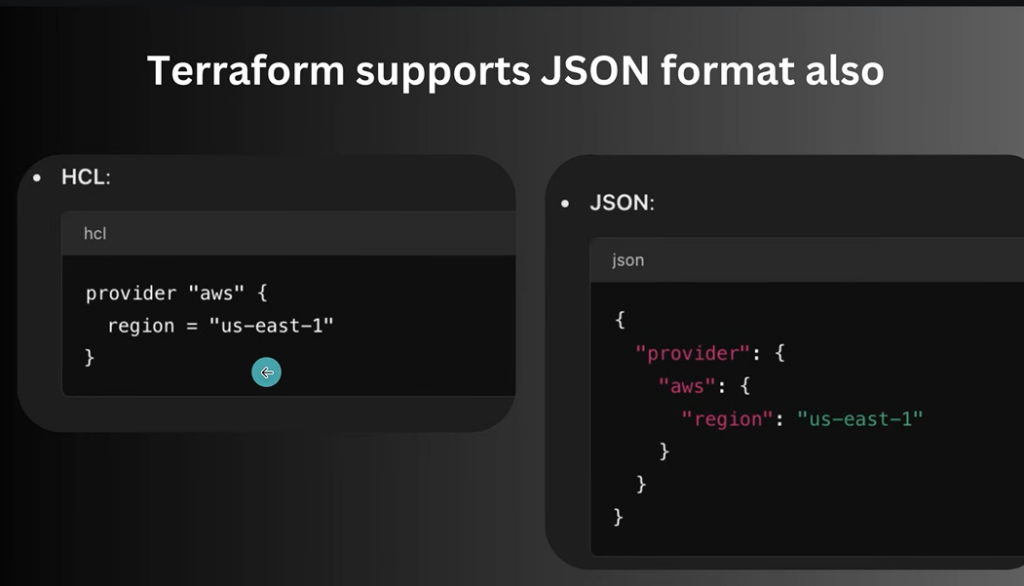
Side-by-side syntactic comparison of HCL versus JSON formatting in deployment scripts.
Terraform uses its native language but remains highly flexible for integration with broader automation pipelines and software development configurations.
Technical Definition: While HashiCorp Configuration Language (HCL) is preferred for its human-readable and clean formatting, Terraform provides native syntactic flexibility by fully supporting JSON alternative schemas. This capability enables automated scripts to generate infrastructure maps dynamically.
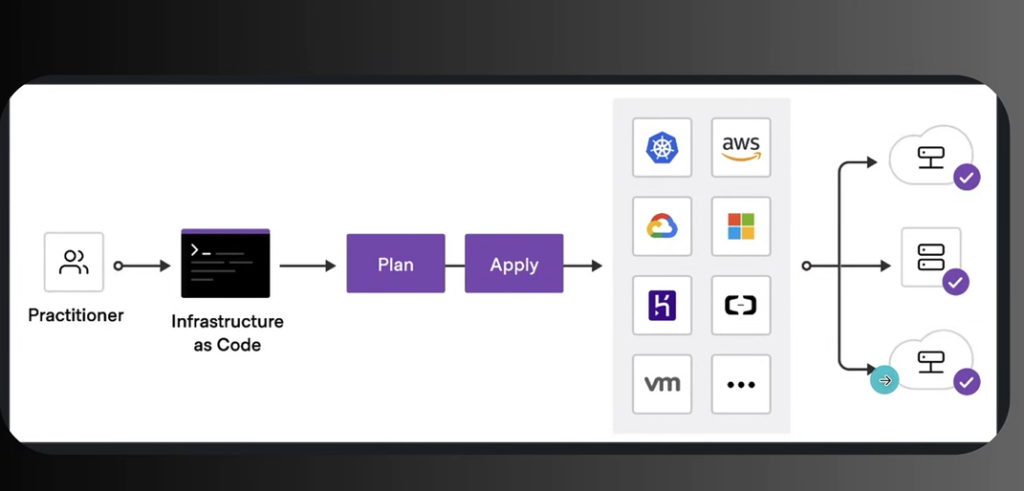
5.The DevOps Core Workflow
: The definitive core workflow loop: Practitioner to Code, Plan, Apply, and Target Provisioning.
The entire operational workflow of Terraform can be summarized in three distinct stages: Write –> Plan –> Apply.
Technical Definition: The operational lifecycle of a modern engineer revolves around a streamlined declarative execution loop. The workflow bridges human intents and virtual environments by shifting seamlessly from written code to architectural blueprint verification, and ultimately to live asset execution.
SYSTEM ADMINISTRATOR & DEVOPS NOTICE:
Want to build a high-paying career in cloud engineering and network automation? The demand for certified IaC professionals in the US market is skyrocketing. Check out the [Link: Top-Rated Terraform Bootcamp & AWS Certification Courses on Udemy/Whizlabs] to clear your HashiCorp exams and land your next major role!
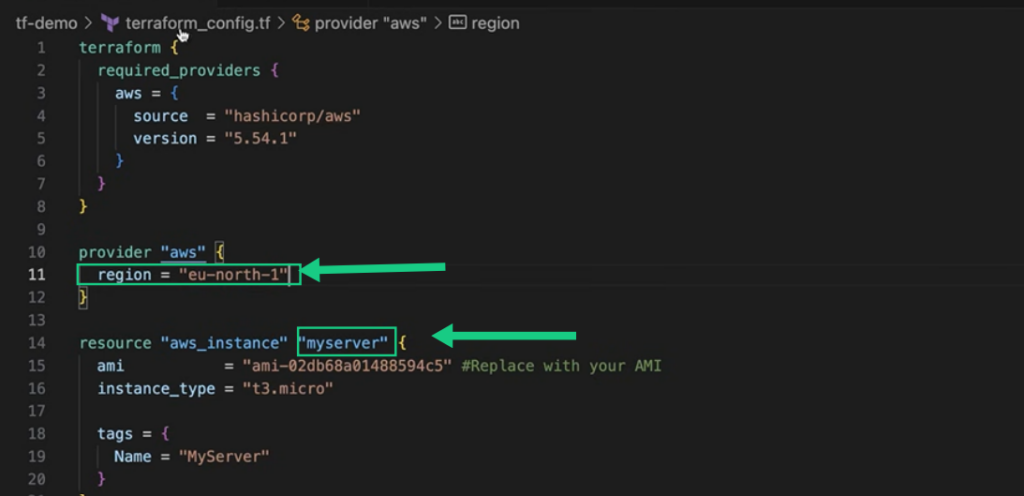
6.Modifying Variables (Region Setup)
Customizing the active deployment zone and assigning unique local references within VS Code.
Let’s look at a practical deployment inside Visual Studio Code. First, we need to declare where our infrastructure will live.
Technical Definition: Configuring target target zones is highly straightforward inside modern IDEs. Engineers can quickly alter geographic region parameters within the provider block and define structural references to direct deployments into isolated global data hubs.
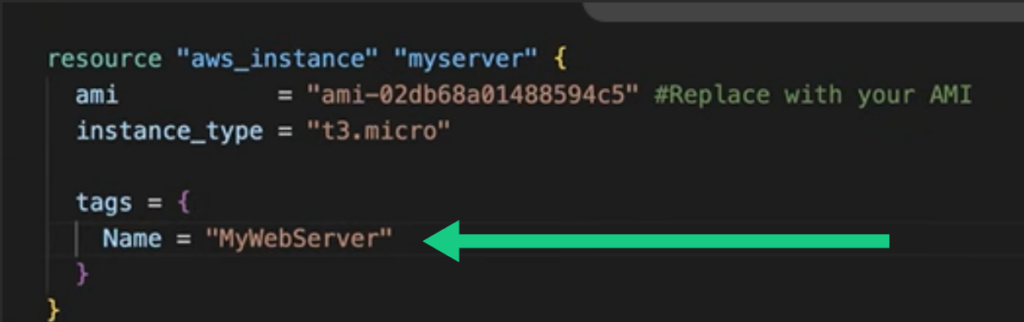
7.Customizing the Server Tag
Injecting metadata values to automatically apply descriptive tracking names to compute instances.
To make sure your infrastructure stays audited and trackable within your cloud account, adding metadata tags is a standard best practice.
Technical Definition: Metadata categorization is paramount for modern inventory governance. Leveraging metadata keys within configuration blocks applies global identifiers directly to target infrastructure, promoting auditable resource organization across vast enterprise environments.
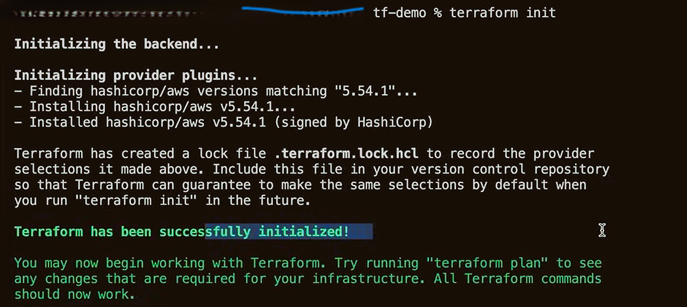
8.Initialize the Workspace (Terraform init)
Running the workspace initialization process to download plugins and prepare the runtime layer.
Once your configuration file (main.tf) is written, it is time to open your terminal and fire up the execution backend.
Technical Definition: Executing the initialization phase prepares the local workspace directory for deployment. This critical lifecycle command constructs dependency directories, downloads targeted provider APIs, and locks provider parameters to assure architectural consistency across environments.
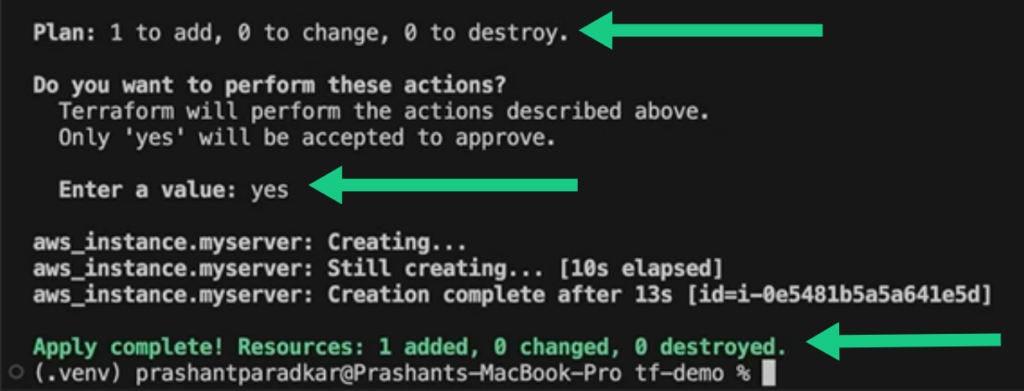
9.Live Deployment Validation (Terraform apply)
Confirming the changes to trigger automated infrastructure creation with terminal feedback.
After running terraform plan to verify the architectural blueprint, we execute the final deployment step.
Technical Definition: The final transition command translates speculative architectural configurations into active physical assets. After checking the change roadmap, confirming the prompt securely enforces runtime creation scripts, completing live resource provisioning inside mere seconds.
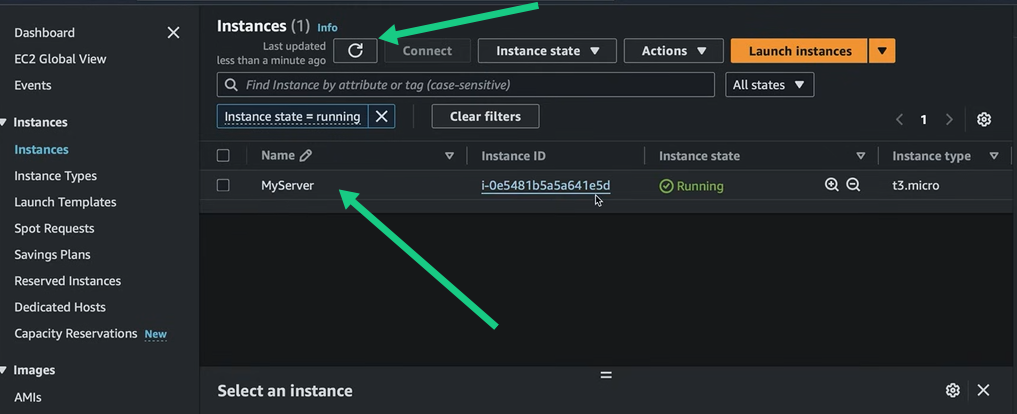
10.Real-Time Cloud Verification (AWS Dashboard)
Verifying the newly spawned instance inside the live Amazon Web Services EC2 dashboard.
The script has executed successfully.Log into our public cloud management console to confirm that our automated code matches reality.
Technical Definition: Validating execution inside the public console provides visual confirmation of automated governance. The active compute instance appears properly configured in the dashboard, matching the sizing, naming parameters, and metadata IDs specified within the baseline codebase.
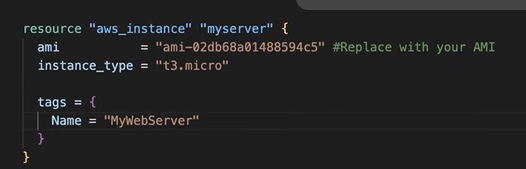
11.Updating In-Place Infrastructure Attributes
Adjusting resource tag metadata inside the active block definition.
When you modify parameters of an existing resource inside your configuration file, Terraform calculates an in-place update rather than destroying the asset entirely.
Technical Definition: To maintain operational continuity, configuration parameters can be safely modified in the baseline script. Adjusting existing identifier keys signals the execution engine to plan a safe, in-place delta update rather than triggering a destructive resource replacement cycle.
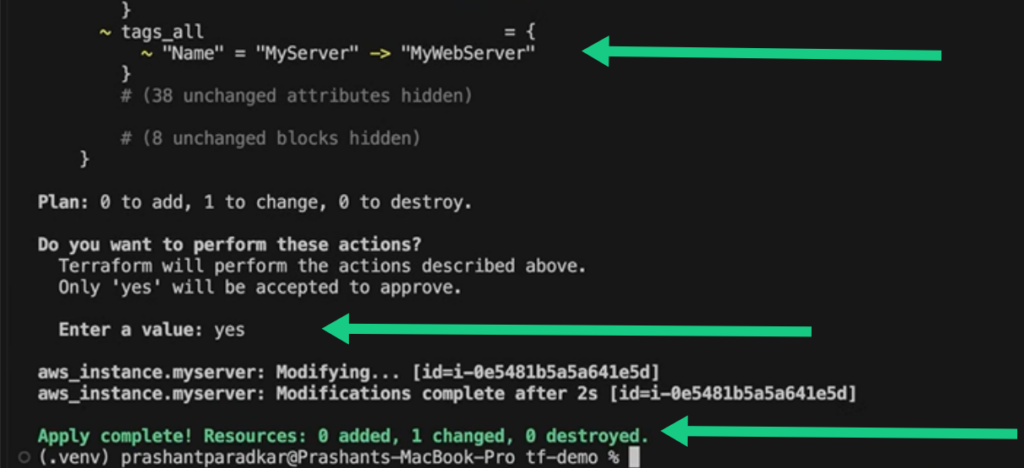
12.Executing the Modification Plan
Confirming an in-place modification within the terminal deployment workflow
Running the apply phase tells the terminal to show you exactly what will change before making modifications on the live cloud.
Technical Definition: The orchestration engine reviews current target states against modified configuration scripts, generating an isolated delta roadmap. Approving the plan securely pushes localized update requests, minimizing downtime by modifying only specified attributes while keeping the surrounding cloud environment entirely untouched.
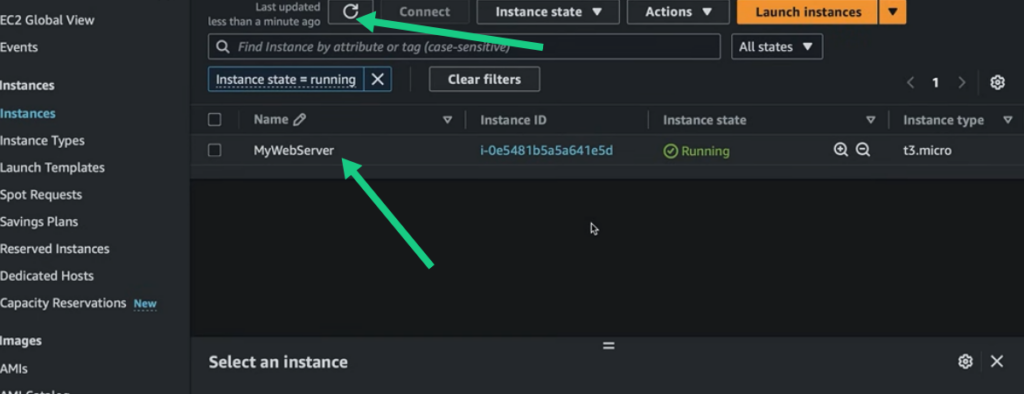
13.Verifying the Live Delta Changes
Live validation of updated resource tags on the cloud compute management console.
Once the update successfully completes, the cloud portal updates instantly to reflect your code alterations.
Technical Definition: Post-execution dashboard audits offer immediate verification of updated infrastructure states. The cloud provider updates asset characteristics seamlessly in real time, validating that the live tracking identifiers match your declared parameters exactly
14.Refreshing Active Cloud Topologies
Confirming stable runtime parameters on the cloud provider dashboard.
Refreshing your infrastructure console validates that the running system has accepted and locked in the new configuration states.
Technical Definition: Re-evaluating running instances ensures the underlying compute hardware is healthy and operational. This continuous baseline tracking verifies that changes remain applied securely and prevent drift across global infrastructure assets.
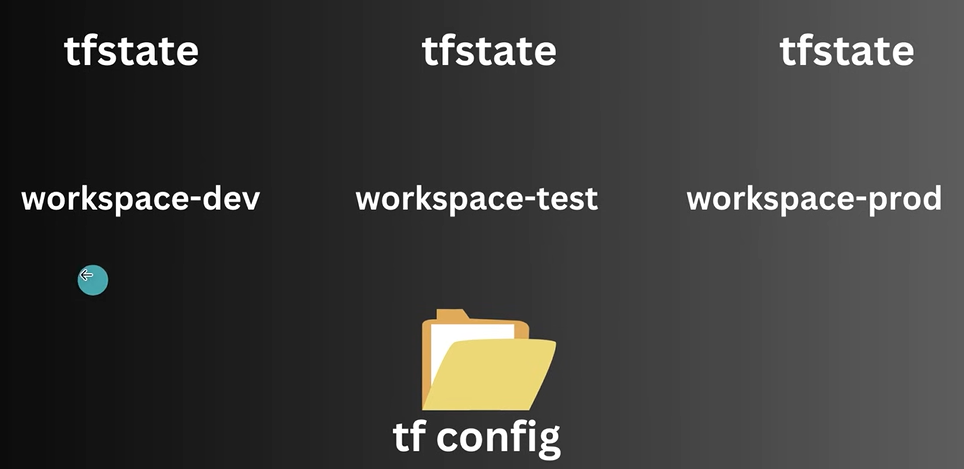
15.State Isolation via Terraform Workspaces
Isolating environments using separate state tracking within a unified configuration folder.
To scale your infrastructure, managing distinct deployment stages—like development, testing, and production—from a single configuration directory is essential.
Technical Definition: Managing enterprise environments requires strict runtime isolation to prevent overlapping changes. Utilizing advanced workspace architectures splits a single configuration baseline into completely independent state backends, enabling engineering teams to deploy parallel Development, Testing, and Production instances seamlessly without cross-environment contamination.
16.State Management & Central Tracking
Enterprise governance demands that state records transition from a local workspace into a securely coordinated environment.
Technical Definition: State management serves as the structural source of truth for declared deployments. The state file acts as a precise database mapping configuration code to active cloud assets, supporting both local execution and centralized remote storage to empower cross-functional team synchronization.
17.Multi-Resource Automation (count vs for_each)
Instead of duplicating structural configurations manually, developers must leverage native loops to provision high-volume clusters..
Technical Definition: Scaling deployments efficiently requires dynamic meta-arguments that eliminate costly, iterative code duplication. Implementing specific multi-resource arguments allows system architects to provision arrays of identical assets or distinct resource sets smoothly using lean, single-block definitions.
18.Code Reusability with Terraform Modules
As architectures grow complex, isolating code blocks into standard reusable directory architectures keeps code bases lean and maintainable.
Technical Definition: Terraform modules act as modular, self-contained architecture packages designed to foster infrastructure reusability and clean layout structures. By bundling collections of configuration scripts inside dedicated directories, teams can establish validated deployment standards across the enterprise.
19.Enterprise Automation via Terraform Cloud
For multi-tenant development operations, moving local code execution layers to a managed pipeline optimizes deployment speed and visibility.
Technical Definition: Terraform Cloud delivers a fully managed platform designed to streamline infrastructure governance and pipeline execution. It elevates team operations by providing built-in remote state storage, secure variable vaulting, version control system (VCS) automation, and continuous delivery pipelines.
Summary & Next Steps
Transitioning from baseline cloud deployments to enterprise-grade operations requires a deep mastery of advanced declarative automation principles. By implementing structured State Management, organizations establish a reliable, synchronized source of truth that securely maps configuration code to active global assets. As multi-cloud environments grow, utilizing programmatic loops like count and for_each eliminates manual duplication by automating resource iteration, while Terraform Modules package complex scripts into clean, reusable structural components. Ultimately, migrating these localized workflows to a managed platform like Terraform Cloud unlocks seamless cross-functional collaboration, secure secrets vaulting, and native version control integration—transforming simple code blocks into a highly scalable, automated governance model.
🚀 DEPLOY YOUR FIRST SCRIPT FOR FREE: Ready to test your automation scripts without risking unexpected public cloud billing? Sign up through our exclusive [Link: Vultr Cloud / DigitalOcean Free Credits] to secure a complimentary sandbox environment and launch your first automated instance today!